Overseas travel is a great way to see the world, experience different cultures, and partake in some amazing food, but one way to ruin the fun would be a big unexpected roaming charge at the end of your trip.
If you set up your phone correctly, it’s easy to avoid charges that would otherwise add to the expense of your trip.
I’ve gathered information from the major Australian telcos to find out what exactly incurs a charge and to find out a few workarounds to help you avoid any unexpected fees.
Guests and Topics on the Show
Mobile Infrastructure on Big Events
When tens of thousands of people gather at major events, mobile networks face enormous pressure. From fans sharing videos to using ride-share apps and mobile payments, the demand for reliable connectivity spikes instantly. Anthony Shiner, Chief Customer Officer Consumer at Optus, joined us to explain how telcos prepared their networks for large crowds. He discussed the technology used to boost capacity, how temporary infrastructure supported big events, and what it took to keep thousands of people connected at the same time.
MWC 2026: Key Announcements and Trends
Mobile World Congress once again showcased the latest innovations shaping the future of smartphones and connectivity. From new devices to advances in AI and mobile networks, the event highlighted where the industry is heading next.Alex Choros, Managing Editor at WhistleOut, joined us to break down the biggest announcements from Mobile World Congress. He shared the key launches, emerging trends, and what consumers should expect from the next wave of mobile technology.
A question that comes up often on the Life & Technology radio show is about the best way to cull duplicate files and photos from your devices.
It’s all too easy to hoard duplicate photos or accidentally redownload files, but what’s the best way to get rid of the extras or pick the best shot out of each set?
In other news this week, Samsung announced their new Galaxy flagship phones coming in March. We have put together the costs of getting the different devices, either directly or via a telco on a ‘plan’.
Guests and Topics on the Show
Tech Support for Seniors
Technology moves fast. For many older Australians, that pace can feel overwhelming. From online banking to telehealth and government services, being connected isn’t optional anymore — it’s essential.
The Australian Seniors Computer Clubs Association, or ASCCA, helps seniors build confidence with technology through community-based learning and peer support. It’s about more than just fixing devices. It’s about reducing isolation, improving digital literacy, and helping older Australians stay connected with family, services and the world around them.
We spoke with Joseph Vijay about how ASCCA supports seniors, what challenges they’re seeing, and why digital inclusion matters now more than ever.
Portable Productivity
Work doesn’t just happen at a desk anymore. Whether you’re at home, in a café, or traveling, productivity needs to move with you.
Portable displays are changing how professionals, students and creatives work on the go. Lighter, more powerful and designed for hybrid lifestyles, they extend your screen space without the bulk of traditional setups.
We had chat with Gary Caldarola from Espresso about the rise of portable productivity, how work habits have evolved, and how portable displays are helping people create a full workstation — anywhere.
Today we discussed how phones, tablets and laptops can connect to portable displays for even greater productivity when you are out of the office. Check out the details on their website.
Every email provider these days has a way to deal with spam automatically. Modern techniques use machine learning to analyse sender IP addresses and domains.
You can assist this machine learning by marking unwanted messages as spam, helping to clear your inbox in the future.
Rarely, legitimate emails can be caught in automatic spam filters. You can double check your spam folder every so often to see if legitimate communications have been misidentified – but in my experience it has been exceedingly rare.
2. Never engage with spam messages
Links in emails are often risky – especially if you don’t know the sender. It’s best practice to never click a link in an email unless you implicitly trust the source.
Attachments are also commonly a vector for malware. It’s best not to download any attachments unless you know and trust the sender.
“Unsubscribe” links in spam emails can often backfire – instead confirming to the sender that your email address is active, resulting in more spam.
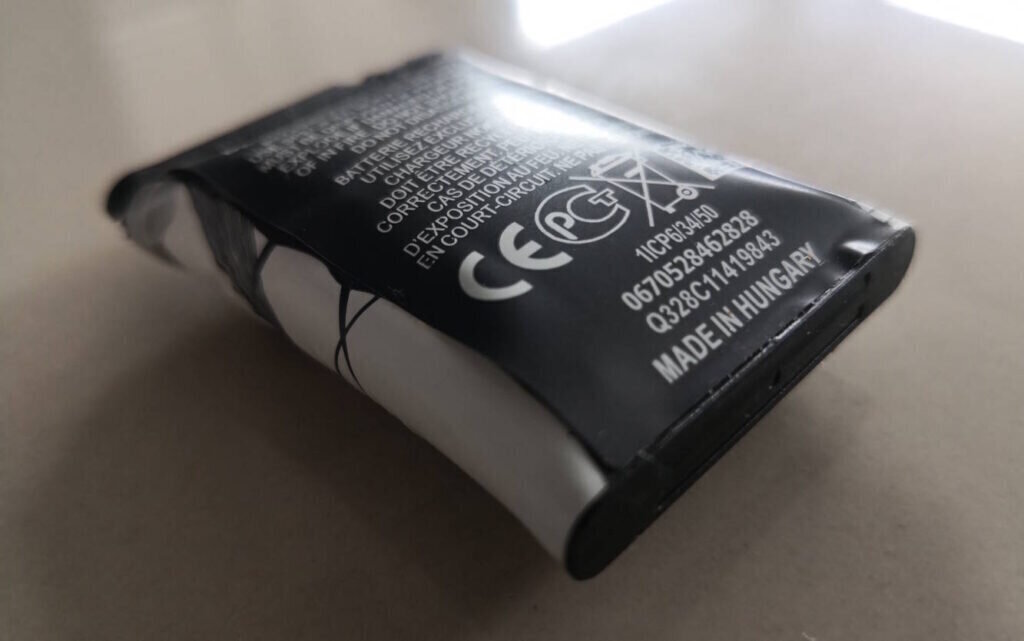
Safe battery handling and disposal is becoming a huge issue for many of us as Australia’s appetite for portable devices soars.Lithium-ion batteries can be found in all kinds of devices today from toothbrushes to phones to e-bikes.We’ve all got a few old devices laying around with aging batteries that can become swollen with time.That’s why it’s so important to talk about how to safely handle and dispose of old devices with lithium-ion battery packs.
Swollen batteries – what you need to knowWhy do batteries become swollen over time?
Battery packs can swell up due to buildup of gas inside the battery pack. Usually this is due to chemical breakdown or physical damage, but it can simply happen over time to some batteries.Other reasons are overcharging from faulty circuitry or overheating from high temperatures. Physical damage like puncture or crushing can sometimes cause swelling as well.When the battery becomes swollen, the device they’re in can become physically damaged, the battery can become harder or impossible to remove, and they become more prone to damage.
Want more tech news, reviews, and consumer guides?Don’t miss a thing – sign up to the CyberShack newsletter and get the latest from our website delivered straight to your inbox. From the newest gadgets and smart home tips to exclusive previews and deals, we’ve got your tech fix covered.👉 Subscribe now – it’s free, and you’ll always be one step ahead in the world of tech.
Guests and Topics on the Show
The Big Screen Shift: How TCL Shaped TVs in 2026
TVs had become bigger, brighter and more intelligent, with Australians expecting more from their home entertainment setups than ever before. As streaming grew and living rooms evolved, display technology moved quickly to keep pace.We spoke with Jason Carrick, Sales General Manager at TCL Australia, about where televisions were heading in 2026. He explained how larger screens became more accessible, how new panel technologies improved brightness and colour accuracy, and how smart features were refined to suit the way Australians watched content at home.
Fibre Fast: NBN Hit 3 Million Customers as Copper Retirement Accelerated
Australia’s broadband network entered a new phase as the shift from copper to fibre gathered serious momentum. Households were demanding faster, more reliable connections to power streaming, gaming, remote work and connected homes.
We spoke with Dion Ljubanovic, Chief Network Officer at NBN, about the acceleration of Australia’s copper sunset. NBN passed three million fibre customers, and speed demand continued to climb. He outlined what this milestone meant for consumers and how the network was preparing for the country’s growing appetite for data.